<design-systems> By Cris Morales
The autonomy vs alignment dial for AI
Naming creates consistency and silence creates variety. By treating your harness as a composition dial, you can leverage agentic silence to produce better, more creative user interfaces.

I wrote about using the Open Design System Bench to measure AI-Readiness in some of our projects, and how that exercise taught us more than just finding mechanical issues in components, props, tokens, etc. We found out that some of our files were actually lowering the quality of the output compared to an agent understanding the codebase without guidance.
I had some assumptions, but was missing a tool or methodology to really measure this. We put in some hours to refactor the harness, and we actually fixed the issues. Most of them were related to hardcoded staleness, like a hand-written props catalog or component list; some to a missing contract or validation gate.
Understanding mechanical and probabilistic
The ODSB measures how agents work with your design system across six axes. Mechanical covers all the deterministic checks. Judgment is measured by a judge model, and it’s probabilistic, because that’s how judgment works. Put more than one person on a decision, and their different levels of knowledge and experience will produce something different.
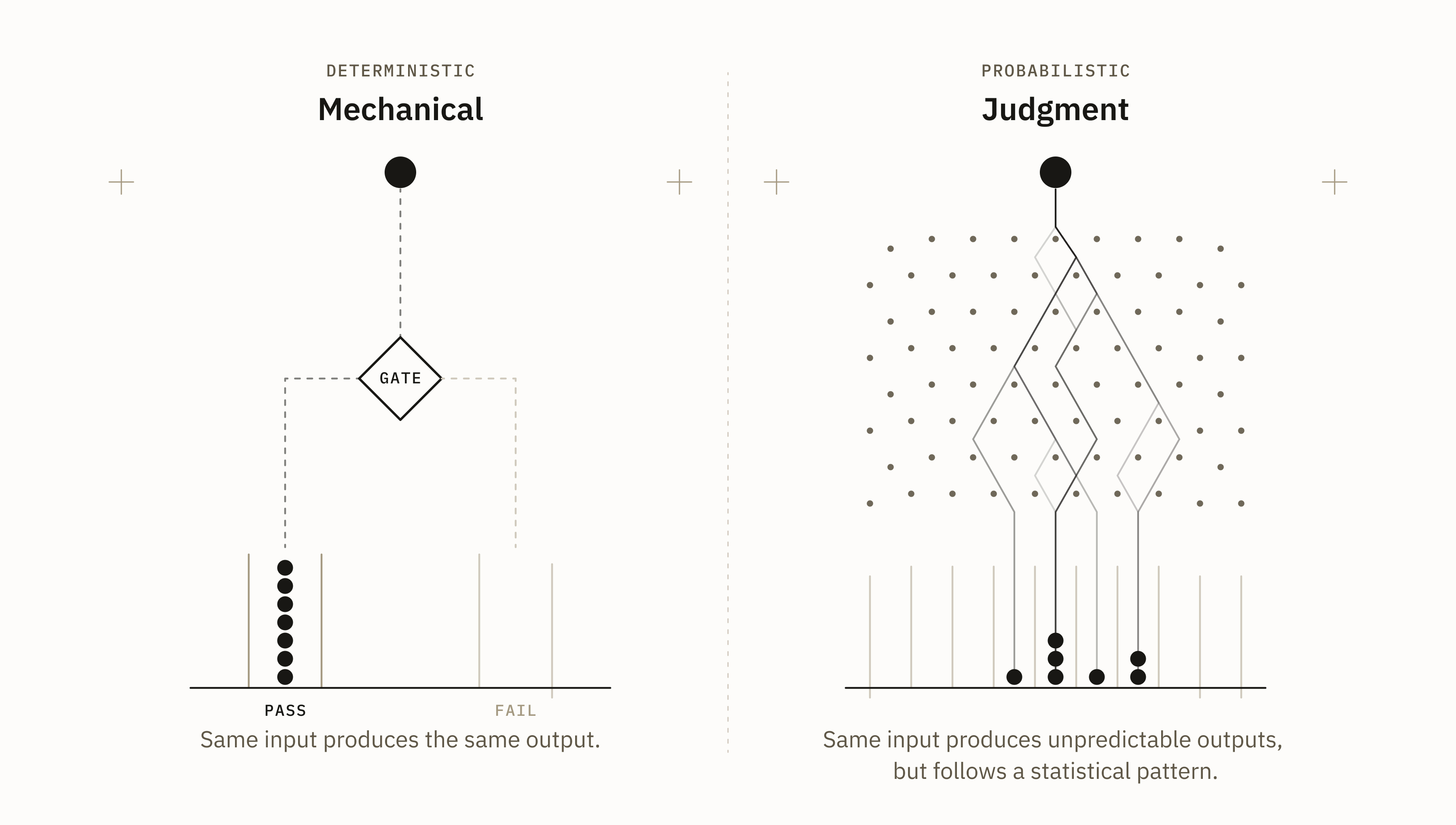
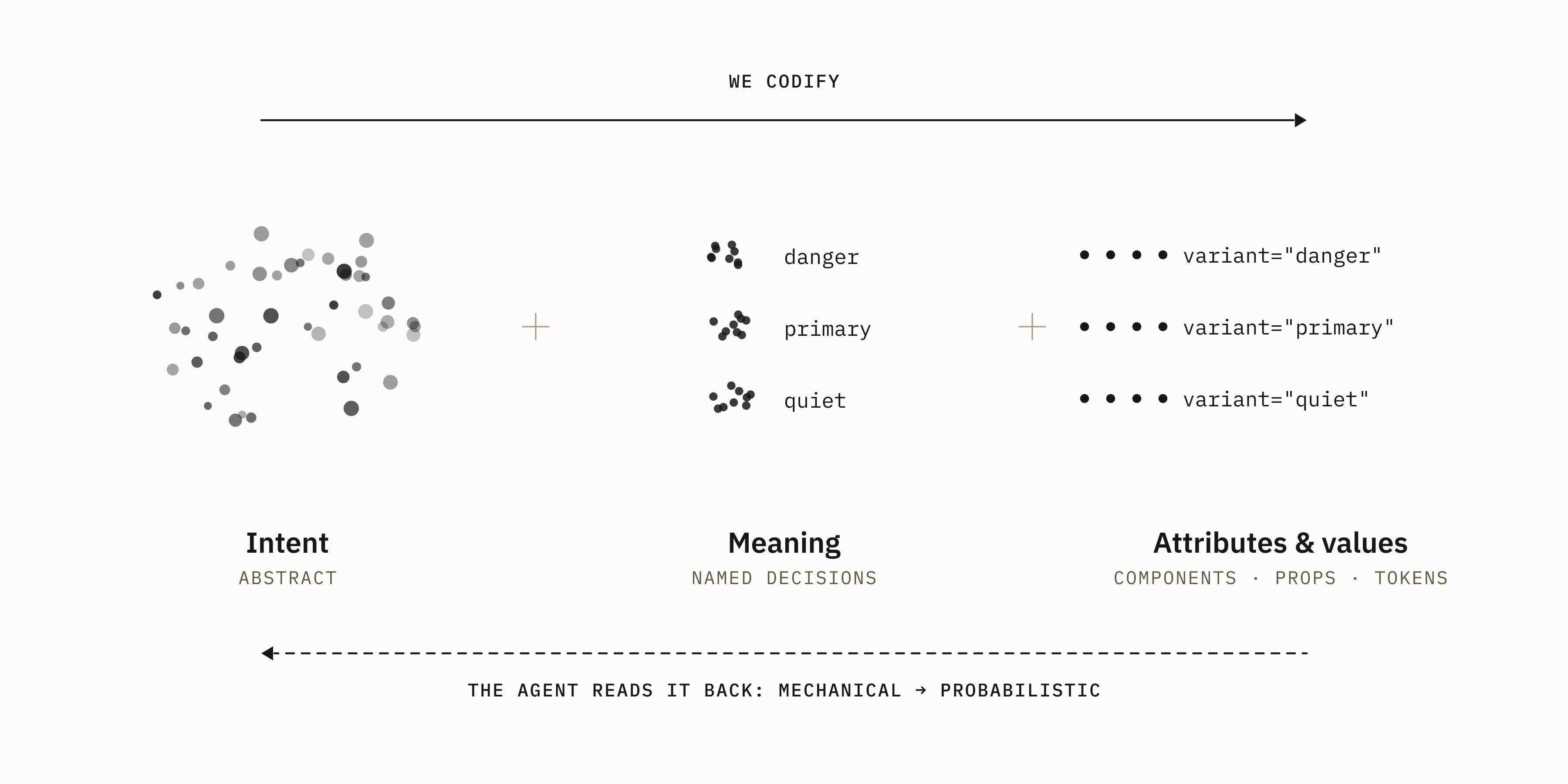
These concepts are important for understanding why your harness might be misguiding the agents. In design systems, we codify decisions as components, props, and tokens. We move from abstract ideas, shaping intent as meaning, so we can lay them out as attributes and values. An agent reading this moves backwards into abstraction, in a way, from mechanical to probabilistic. That’s what judgment measures.
Some light on harness
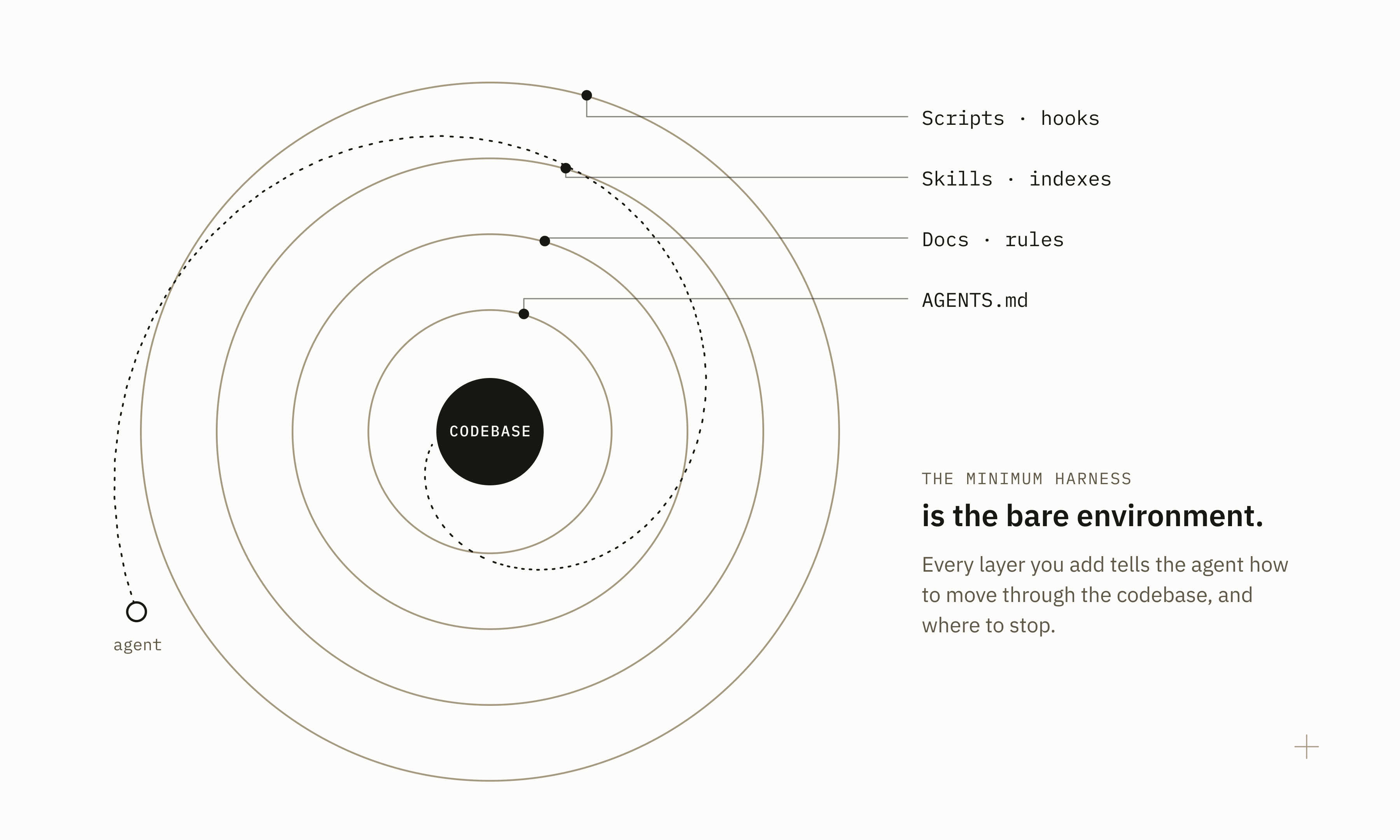
Let’s define harness in simpler words: it’s the set of rules, instructions, context, tools, and guardrails that tell an agent how to operate in a given environment. This can be extended to the whole operational layer around the model.
The harness has two axes: runtime complexity (this piece is a bit over my head), and project structure, like explicit instructions (AGENTS.md), docs, rules, skills, indexes, scripts, hooks, and so on. VS Code explicitly separates the execution environment (the codebase) from the agent harness. But I like the idea that your minimum harness is the bare environment.
You have probably heard or read about the concept of light versus fat harnesses. In my previous post, I mentioned how we reduced a single AGENTS.md from 7,000 to 700 lines of code. Did I make the harness lighter? It depends on what you measure. In lines of code or bits, for sure. But what if we think about how much richer its structure was at the end?
The question should be: how much knowledge and operational structure has been externalized for the agent?
Sources of hallucination
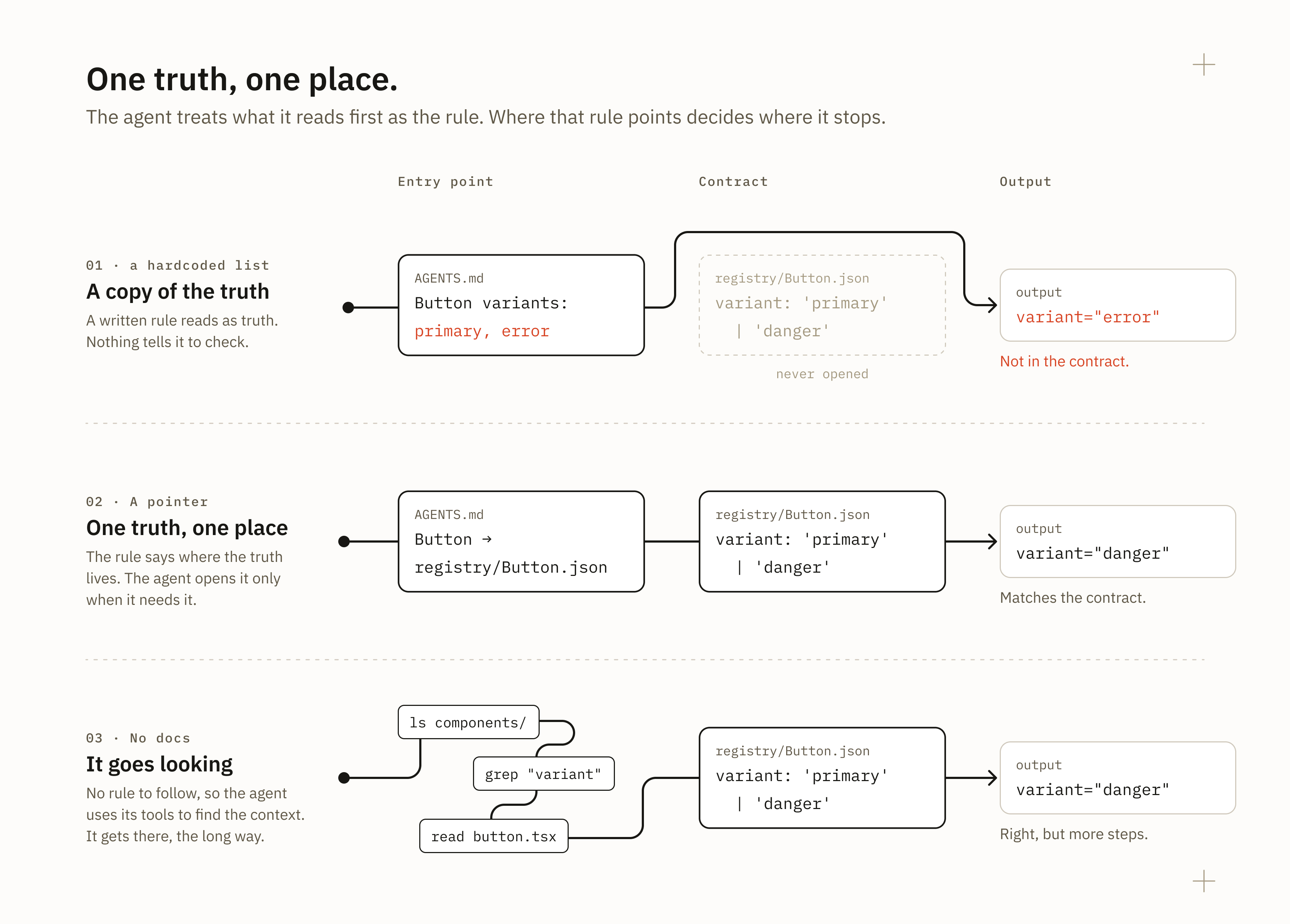
Every new file is a potential source of hallucination. In my previous article, I wrote about the principles of separation of concerns and progressive disclosure when architecting our repo structure. How we lay out the harness is about paving the road for the agent to find what it needs, on the expected path, when it needs it. These files should be laid out as an index, because stating the same truth in many places makes the system fragile. Especially if we are hardcoding stuff that should be dynamic, like a component, prop, or token catalog.
Agents consume files as truths. That’s the point of them: a harness file exists to stop unnecessary exploration. If your AGENTS.md file states a rule, the agent follows it and stops there. If your DESIGN.md lists tokens and components, the agent takes that list as the whole catalog and won’t look further. We measured that modern agents produce better output from reading the bare codebase. Working on files and docs for your harness is not something you solve in one prompt. It needs a methodology, and an understanding of how to measure and tweak.
Experiments on judgment
It’s known that the mechanical dimension is mostly solved, in different ways. Tooling, knowledge, and capabilities have matured to a point where people like us at Southleft can focus on problems that were historically deprioritized, so we can push the industry and the maturity of the discipline forward.
Judgment is something else, though. How can we set a baseline for something that is subjective and variable even among humans? Its mechanics are complex and require more than a 1M-token context window, considering that judgment comes from all our knowledge of a subject, our experiences, and the context available to make a decision.
This is why AI has a hard time with design. How do we simplify design judgment? I would say by scoping, and by creating layers for how the agent makes decisions. But then, how do we decide what AI can decide? There is some great reading from Pegah Ahmadi on this and more.
Pulling back. I started experimenting on my own, running some evals, and creating a methodology and test suites. TL;DR: it’s not easy, and it really needs you there.
A loose example
I started by cherry-picking some of the ODSB tasks, but the design guidelines we wrote didn’t move the needle a bit. Those tasks were too focused on the mechanical dimension, so I extended them to these three:
“Build the workspace settings page. Admins edit the workspace name, web address and logo; see who is in the workspace, invite someone and change or revoke a person’s access; check the current plan, how many seats are used of the total, and when the next invoice is due; and, rarely, delete the whole workspace. Saving changes should feel safe, and deleting should be hard to do by accident.”
“Build a moderation queue for reported comments. Each report shows the comment, who reported it, why, and when. Moderators work through dozens a day: they approve or remove reports one at a time or several at once, and narrow the queue down by report reason. When there is nothing left to review, they should know they are done.”
“Build the project overview a team lead opens every morning. It covers the project’s overall health, anything currently blocking the team, deadlines in the next seven days, and recent activity. In a few seconds the lead should be able to tell whether anything needs their attention today.”
Based on a custom ODSB fixture, I ran two scenarios: (A) AGENTS.md vs. (B) AGENTS.md + design guidelines, five times per task. The bench produced the results and reports, but also saved each prototype artifact and its screenshots for me to compare.
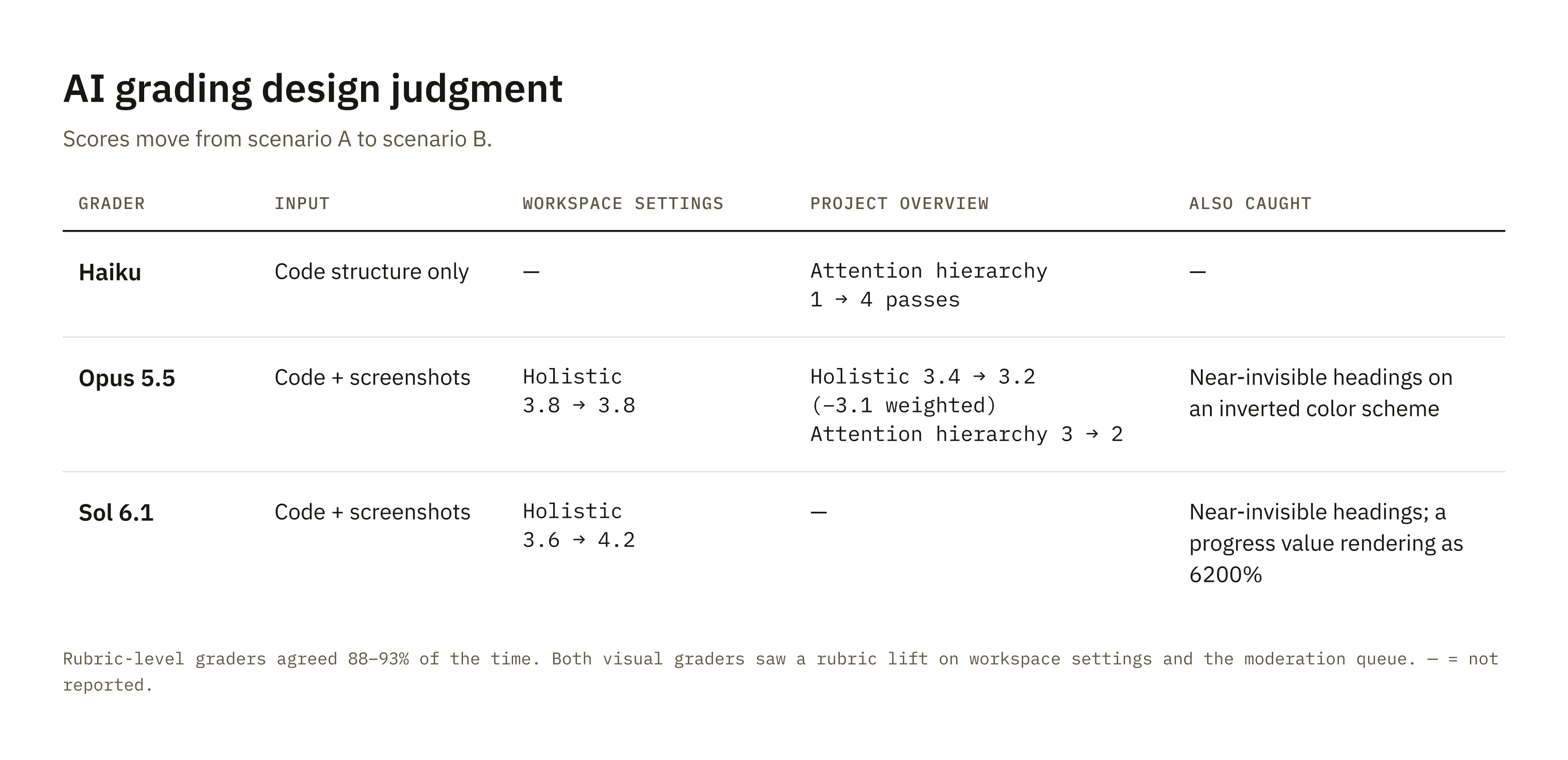
Haiku was the judge agent, but I noticed it only graded based on the code structure. It was missing a visual pass even with screenshots provided (I think this comes from the bench setup). So I generated an environment to have some agents re-grade independently of each other, including a visual pass. I used Opus 5.5 and Sol 6.1. Both graders saw a lift on the rubrics for workspace settings and moderation. Opus saw almost no difference in overall design quality; Sol saw some, mostly on workspace settings.
On the project overview’s attention hierarchy, Haiku saw a lift (1 → 4 passes), but Opus, looking at the screenshots, reversed it (3 → 2). On top of that, both visual graders caught attention headings that were nearly invisible on an inverted color scheme, and Sol also found a progress value rendering as 6200%.
They summarized the results as: “A was recipe-based, and B more compositional.” In scenario A, AGENTS.md had recipes and worked examples, so every run gravitated toward the same composition. B’s guidelines stated principles, so runs converged on those decisions and diverged everywhere else.
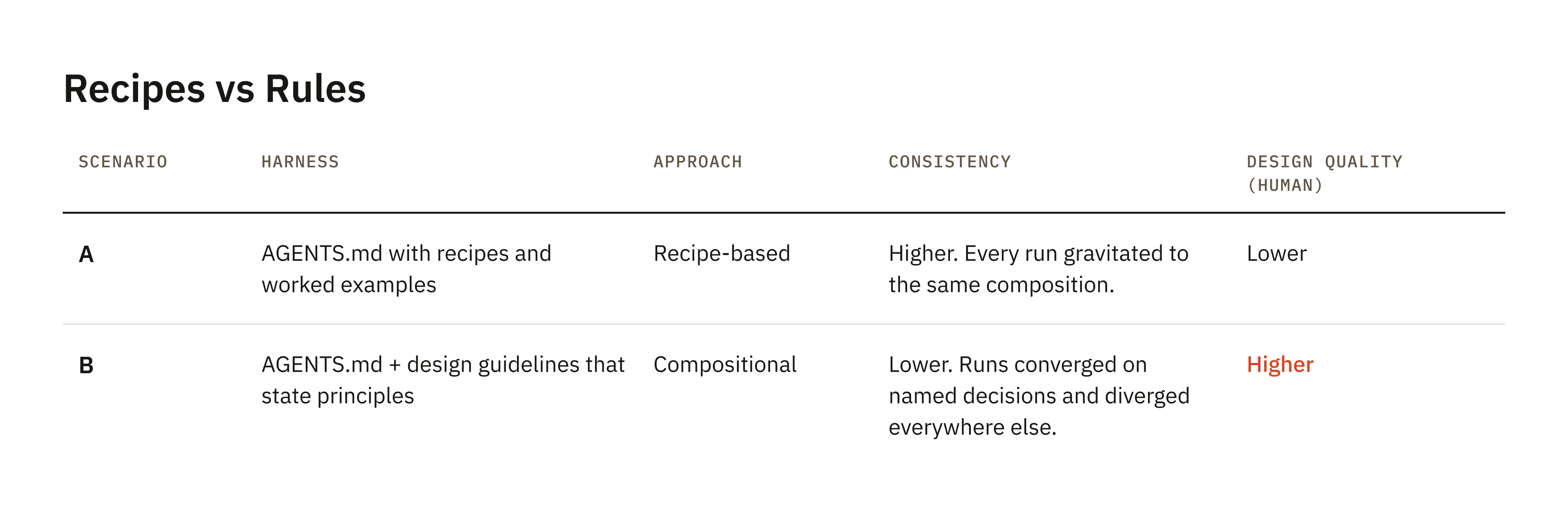
We actually got more consistent output from scenario A. The models’ holistic scores barely moved: Opus went 3.8 → 3.8 on workspace settings and actually down on project overview (3.4 → 3.2, with a −3.1 weighted delta). Sol was more positive (workspace 3.6 → 4.2). Rubric-level graders agreed around 88–93% of the time, but judgment was nearly flat.
What did people say?
I asked Claude to build a tool that pairs the screenshots for a blind review and asks which one has the better overall design, and which one has the better layout and use of space. Pretty simple, but I’m seeing the potential and how to expand it. From my own pass, I got 13/15 in favor of the guidelines, including 5/5 on workspace settings, disagreeing with the agents. During a masterclass, I asked participants to do the blind test.
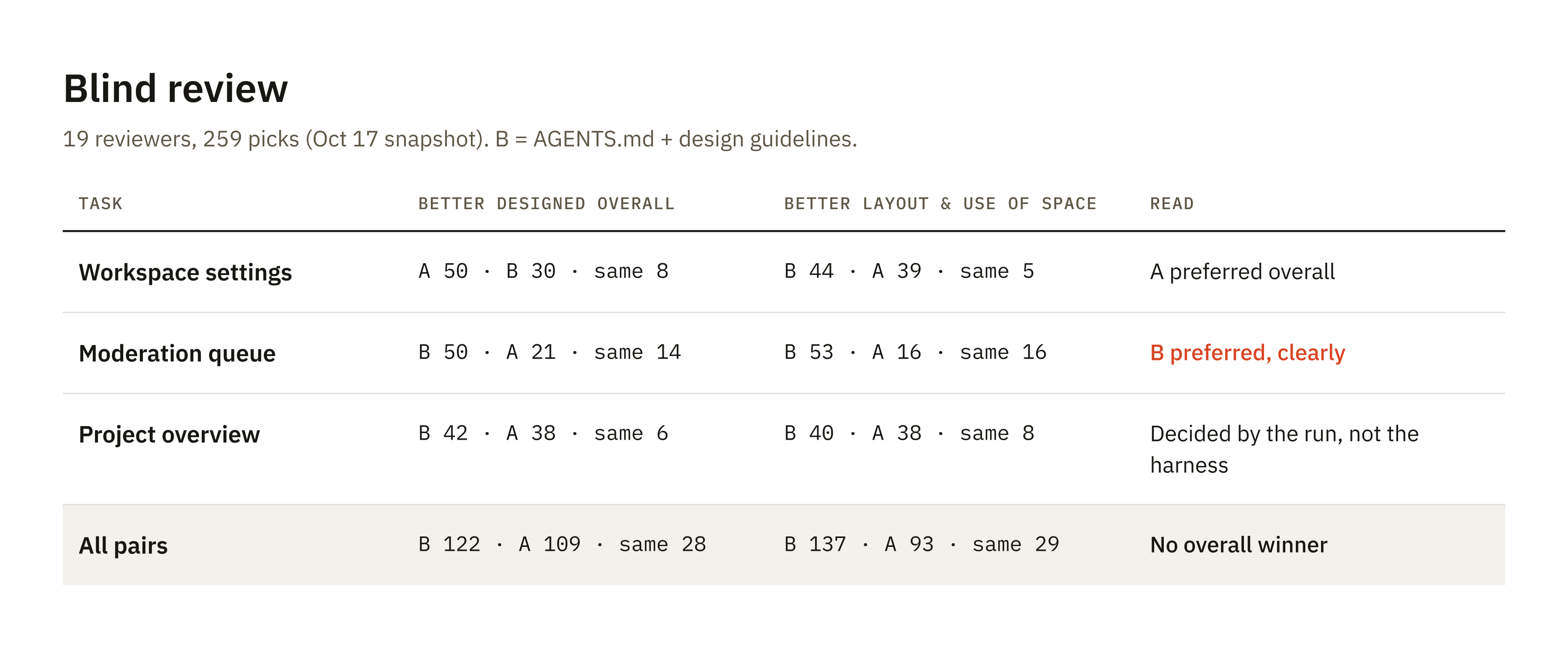
19 reviewers went through the same 15 pairs, blind, with a few more questions: attention, whether it does the job in the brief, and how clear and safe the actions are. There was no overall winner. The moderation queue went clearly to the guidelines, 50 to 21. Workspace settings, the one I gave 5/5, went the other way, 50 to 30 for scenario A. On the project overview, reviewers agreed almost unanimously on each pair, but which harness won depended on the run, not the harness.
My assumption on layout and use of space was validated: 137 to 93 for escenario B, what these compositional guidelines are trying to improve. The models’ “nearly flat” judgment was closer to the panel.
During my pass, I wrote notes about not liking the solid remove buttons fighting for focus. Both grader models independently flagged the same thing. This is a great example of how to turn this exercise into a new rule: “a destructive action is never more prominent than the primary decision.” It’s the method working as a loop: output > eval > signal > rule > start again.
Is consistency that important?
As with everything in life, it depends. Visual consistency is solved; that’s mechanical, and it’s about getting the right component, variant, API fidelity, or token discipline. I’m talking about design consistency: composition, information architecture, and visual hierarchy. On this particular project, having more variability actually helps. The provided guidelines are general rules for composition, so they are working as intended.
Harness design for judgment means choosing which decisions to name, because naming creates consistency and silence creates variety. Deciding where the model is free turns consistency into a dial. If you want to optimize your harness for consistency, you need to put hours into more evals and fine-tune guidelines that could potentially be product-specific.
This is the kind of work we really nerd out about at Southleft. If you’re working through this on your team and want to compare notes, we’d love to talk. The conversation is more interesting than the discourse.