<ai> By Ben Voran
A Browser Can Generate Your Design System’s UI Now, If You Guide It
A 2 GB model in Chrome can compose a working UI from natural language. But it only works if the design system has a repair layer, and building that taught me a ton.

When Google shipped LiteRT-LM.js, a runtime that runs a Gemma 4 model on your GPU in a Chrome tab, I had an idea. Point it at a design system and let someone describe an interface in plain language and get a working one back, with nothing leaving the browser. “Look ma, no servers!” Why do this? I wanted to see if using a small locally running model in a browser could power a Generative UI engine. I spent a few weeks building a runnable demo with my old buddy Claude.
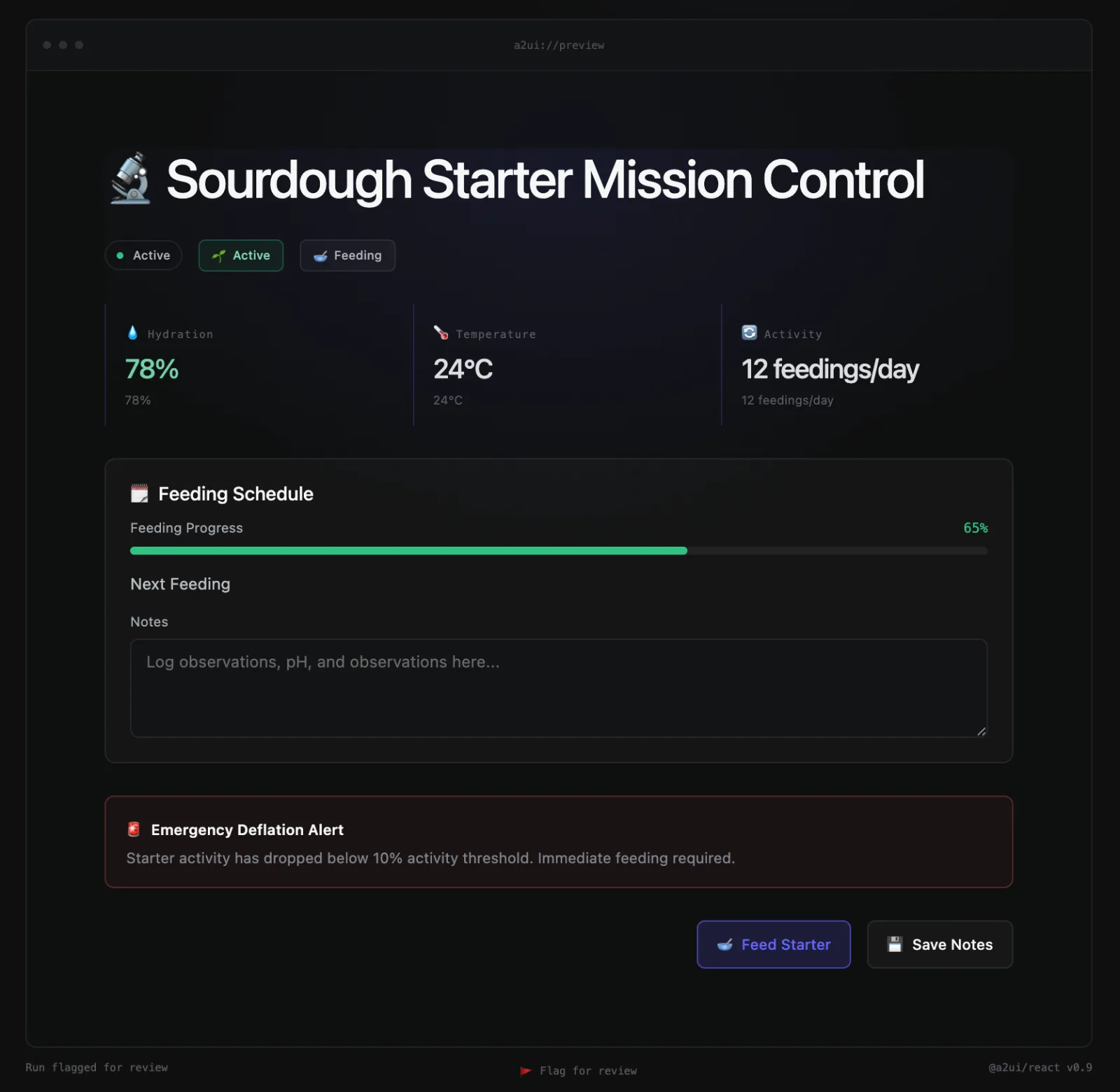
TL;DR: It works! After you load the model, switch off your internet then type “Mission control for my sourdough starter: fermentation progress, feeding schedule, rise metrics, and an emergency deflation alert” and about thirteen seconds later there is a dashboard with stats, a feeding progress bar, a status badge, and a big red EMERGENCY ALERT.
POC Details:
- The Models are only two billion parameters and roughly 2 GB.
- Design system has eighteen React components (I’m using “design system” generously here).
- The protocol between them is A2UI, Google’s open format for agents that describe interfaces.
- There is no data layer so the model is making that up too.
- Mobile browsers aren’t supported yet (sorry)
Getting reliable generations took two things:
- Tuning the keyword hints in A2UI improved composition fidelity. Obvious to anyone who has used A2UI, but less capable models amplify the effect.
- Implementing a guardrail layer. Before this I was consistently getting JSON errors and A2UI couldn’t use the output.
- Fine-tuning the Gemma 4 model significantly increased the fidelity (I know I said two. This 3rd was a surprise to me too and seeing it here is my way of sharing that surprise feeling with you).
I found that a small on-device model can generate UI in the browser, but only if the design system pushes back. Documentation and a schema get it close. Checking and repairing the output gets it to usable.
This is a long, technical and opinionated read so grab something hot to sip and dive in with me…
Why I picked a model that was going to struggle
Gemma 4 E2B is a Google model with about two billion effective parameters, packaged to run on your GPU through WebGPU. I also wired up Chrome’s “Gemini Nano,” available behind a feature flag. Both decode greedily, always picking the single most likely next token, so the same prompt gives you the same answer every time.
I set a 4,096-token budget for prompt and answer together; the catalog prompt alone takes about 1,200. Gemma can take more, but 4,096 is roughly the floor Chrome documents for Nano’s session window. Just know this is an artificial limit.
I wanted the smallest footprint: one model behind a feature flag, the other a 2 GB download. A frontier model is right often enough that you stop building for the times it’s wrong. A small model is wrong loudly and constantly, so every weakness shows up in the first ten minutes. Getting a two-billion-parameter model to produce usable interfaces forces you to build reliably.
Think of it like designing for the worst screen first. Kinda like mobile first, or Progressive Enhancement, from a time when people considered that not everyone had JS turned on. Maybe I can coin a term: Progressive Intelligence Development?
Docs and schema: the part that worked
In A2UI, the catalog is the model’s entire vocabulary: it emits named components with properties and child references, while my React implementations control their appearance. The model never writes HTML, CSS, or JavaScript. My catalog is my design system: Page, Card, Heading, Text, Metric, Button, a couple of form fields, the usual suspects.
Think of it as handing a model a coloring-book version of a design system. The model gets to color, sometimes in colors I would not have chosen, but it can’t draw outside the lines because there is no outside. Read more on the A2UI from a previous post here.
Where docs and schema stop
What the model could not do was write any of it down to spec. I should have seen this coming, given that I was having problems fitting the entire JSON schema into the system prompt.
Of those sixty-five first attempts, twelve were valid JSON. The model would describe a card’s children as “Heading, Metric, ProgressBar, Tag” and then emit each of those four things using the card’s own id, a parent-pointer syntax it invented on the spot and used consistently for the rest of the output. Once it never closed a single object at all, and the whole thing parsed as one giant component whose repeated ids kept overwriting each other. Technically, that is one overworked component.
Pushing back the wrong way
The first thing I tried was the obvious thing: show the model its errors, and ask its bigger cousin to tweak the POC again. The second and third attempts quoted the parse errors and the start of its rejected output. Different bytes, same failure. With greedy decoding and a two-billion-parameter attention span, “please fix yourself” is not a lever you can pull. I was putting the same flat-pack furniture back in the box and hoping.
A bigger model was the obvious move. But the logged output showed the design was there, encoded badly. What was missing was a layer to read what the model meant.
Pushing back the right way
The eval layer runs on three rules:
- It may only reattach what the model actually emitted.
- It never sees the prompt.
- And it never invents content.
The first rule does most of the work: the layer trusts the order the model emitted things, hands loose components to the container that came just before them, and keeps four fields with the same id and different labels as four fields, because a small model shows structure through sequence far more than through references. The second keeps it honest: without the request, it can’t quietly add the date field you asked for. The third costs something: a missing label can be recovered from text the model wrote, and if there is none, the component goes. After the repairs, the strict validators run unchanged, my component schemas and then the official A2UI processor, and only if nothing renders at all does the model get asked again, at most twice. The stage-by-stage walkthrough (https://github.com/southleft/local-generative-ui-demo#the-guardrail-stage-by-stage) shows each pass, with real examples from every stage (https://github.com/southleft/local-generative-ui-demo/blob/main/docs/generation-pipeline.md).
Success
Because the model decodes greedily, it is deterministic and I could replay logged runs through the layer before and after each rule, on identical bytes. A run that had failed all three attempts renders nineteen components on the first try. A checkout that had reached eight components after three attempts and fifty-two seconds renders twenty-eight components in sixteen seconds, including the shipping-method dropdown and the place-order button that the earlier version had lost. You can try the demo with and without the guardrail recovery to observe the difference it makes.
The second model
I pointed the same six prompts at Gemini Nano, expecting the guardrail to carry it as it carried Gemma. But it didn’t. Chrome enforces the JSON schema during decoding, so every one of the first eighteen runs was valid JSON on the first try, something Gemma managed once in eight. The damage was inside: invalid property names, inaccurate children, a declared root that didn’t exist and one example with not one word of text. My guardrail knew Gemma’s habits but not Nano’s. I probably could have gotten Nano working too, but I left it in the POC as is so you can see the unique failures.
What it can’t do and what I learned
I have to be realistic with a model this small. It’s easy to overload it and I didn’t quite find a specific threshold of components but I can tell you that 4 components will render way more correctly than 24. Would I feel comfortable shipping something like this on a live project? Probably not. But making it work at all taught me a lot.
I think all this learning applies beyond small models.
An AI-facing design system has at least three layers. Documentation guides the model toward what exists. Schema guides the renderer toward what’s allowed. Neither one can tell you how the model is doing, and neither one can tell you when you’ve broken something yourself. That information comes only from the third layer, the one that guides each generation back inside the lines: a definition of valid output, a checker that applies it on every run, a decision about what happens when the check fails, and a log of what was done. Teams building for generative UI will realize quickly that this layer is where the magic is.
The two-gigabyte model made that impossible to ignore, because without the third layer it rendered nothing. A bigger model would have let me ignore it for a while and I think that could be worse.
If you’re building one of these
Define valid output before writing code. Mine: a root, at least one visible component, every component in the catalog, one parent per node, a bound value only on inputs. With that list, borderline cases resolved in under a minute.
Write a deterministic, prompt-blind checker and run it on every generation. Keep the forgiving reader separate from the strict validator: two simple parts, with a switch to turn the first one off and see what it contributes. It’s still the most convincing thing in the demo.
Write down your failure policy. I interpret first, validate last, and ask again only when nothing renders. Log and count what happens; that count is your quality score.
Keep every raw output. It’s how you’ll find out the model was mostly right, and maybe how you weren’t.
The Pleasant Surprise – the third model
The model kept getting the design right but the syntax wrong. Syntax is something you can teach. So I put on my teacher hat and taught it with Claude as my acting principal.
The training data was already in the log: repaired generations paired with their prompts, exactly what I wished the model had written. I trained a LoRA on Gemma 4 E2B, a small correction beside the frozen model’s attention weights in the last sixteen layers. Two million parameters, an eight-megabyte file, seventy-two minutes on my laptop. The training and browser walkthrough has the details and diagrams.
Here is the two-billion-parameter model before and after, measured in the browser on the same page with the same guardrail:
| 58 hard prompts, from data | valid JSON on the first try | passes strict validation | median guardrail adjustments |
|---|---|---|---|
| stock Gemma 4 E2B | 4 | 1 | 6 |
| the same model, trained on my catalog | 50 | 50 | 2 |
Getting it into the browser was harder than training it. LiteRT-LM.js only accepts Google’s specially compiled files on its normal path and told me so twice. A second, undocumented path takes a standard export but needs the whole file within 4 GB; the heap-resident loader source shows how I used it. Every int4 quantization I tried wrecked the fine-tune. So I ended up using int8 but still had the size problem. The vocabulary was the answer: 60% of the model was token embeddings; my prompts use 11 thousand of Gemma’s 262 thousand tokens. Pruning to 32 thousand brought the file to 2.14 GB, smaller than Google’s own. The published model loads quickly with decent internet and is in the demo’s picker alongside Nano and the stock model.
If you want to train your own
What this experiment actually needed, so you can tell before you start whether it will run on your machine:
- An Apple Silicon Mac with 32 GB of memory. Training peaked at 17.7 GB with the model at 9.3 GB of that, so 16 GB is out.
- About 50 GB of disk for one run: the base checkpoint, a text-only copy, the merged model, the pruned model and the export.
- Two hours per run: 72 minutes of training for two epochs, the rest for merging, exporting and the browser exam.
- A few hundred validated examples and a way to label them. I trained on 688, and 240 of them came straight out of the app’s own log.
- Free software throughout: mlx-lm, litert-torch, Node, Chrome. Versions and every script are in the repo’s
training/folder.
Chrome needs about 3 GB of free memory to run the result, and the vocabulary prune is not optional: without it the file does not fit the browser’s 4 GB ceiling.
What I’d try next
While I was building this experiment, I found out about OpenUI. Honestly, I wanted to give up after reading about their protocol and model training, because I felt someone was already doing it better than I could. But I didn’t, and I realized their offering is generic and won’t run in a browser tab, which is a meaningful difference from what I’m doing. Seeing their success has motivated me to take this experiment further: try their models, and explore what it would take to run them in the browser. That’s where I’d like to go next.